

Discord is becoming one of the most popular communication platforms among young people and gamers. It is a messaging and voice / video service where users can join servers (communities) or create their own to chat, share images, videos and links with others. There are some important things you need to know, particularly when it comes to exposure to strangers and the challenges of monitoring activity across the app.
Why is Discord Dangerous for Children?
Discord was designed for adult users, and in the UK it carries a minimum age requirement of 16. However, the app does not require most users to verify their age when creating an account. In fact, the majority of users can sign up and use the platform without ever being asked to confirm their age. While Discord has introduced age checking measures for certain features, these are only applied in limited situations, meaning younger users can still access the app and create accounts without parental awareness.
This raises safeguarding concerns as Discord lets users communicate with people from around the world, including strangers. Thousands of public servers exist online, and young users can join these communities and start interacting with others almost immediately.
Creating a Discord account is also very simple. Users only need an email address or a mobile number to sign up. For ParentShield users, the system blocks any verification SMS sent during sign-up through the ParentShield Portal unless the account holder has enabled “Machine to Person Texts.” However, email verification codes cannot be restricted in the same way, which can make monitoring more challenging.
Discord often promotes itself as a ‘secure’ platform, but this can be misleading, particularly for younger users. It allows people to connect and communicate with others across the world, including strangers. however, parents have very limited visibility over calls and messages, which can increase potential risks.
In comparison, a ParentShield SIM provides a much higher level of monitoring and control. Parents can view all calls and texts made over the mobile network through the ParentShield Portal, giving them clear and reliable insight into their child’s activity.
How Can I Monitor My Child’s Communications?
To monitor a child’s Discord account, you must first ensure that you have set an account up for yourself. It is important to note that Discord advise using the app, rather than the browser. After installing the app and creating an account for yourself, the set up process is fairly simple.
- Parent Phone
- Open Discord
- Profile
- Settings
- Family Centre
- Connect with Teen
- Child Phone
- Open Discord
- Profile
- Settings
- Family Centre
- Connect with Guardian
A single parent account can connect to up to 8 child profiles, making it easy to manage and monitor multiple children from one place. This setup supports effective monitoring across all linked accounts. Additionally, each child account can be monitored by up to three different adults, allowing for shared monitoring and supervision where needed.
The parent can monitor,
- New Friends: Recently added contacts, including display names and avatars
- Users Messaged & Called: People your teen has interacted with via direct or group messages, along with their display names and avatars
- Total Call Minutes (Voice & Video): The total time spent on calls across direct messages, group chats, and server voice channels
- Top Users and Servers: The five most frequently contacted users and most active servers over the past week
- New Servers: Any servers your teen has joined or created, including names, icons, and member counts
- Active Servers: Servers where your teen has recently sent messages or joined voice channels
- Total Purchases: A breakdown of spending, including shop purchases and Nitro subscriptions (shown during the billing week)
As part of the ongoing monitoring experience, you’ll also receive a weekly email summary providing an overview of your teen’s activity, sent to the address used during sign-up.
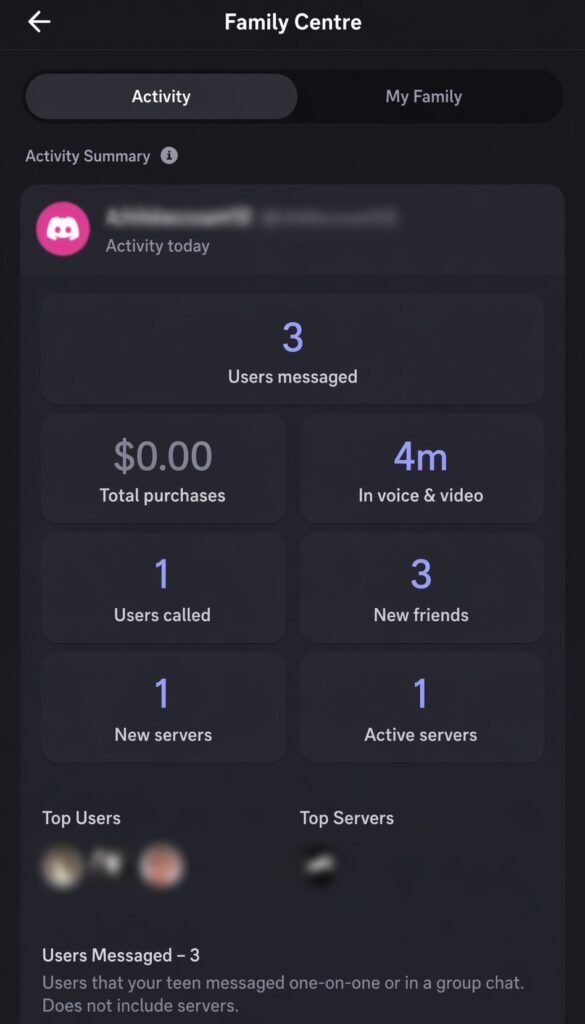
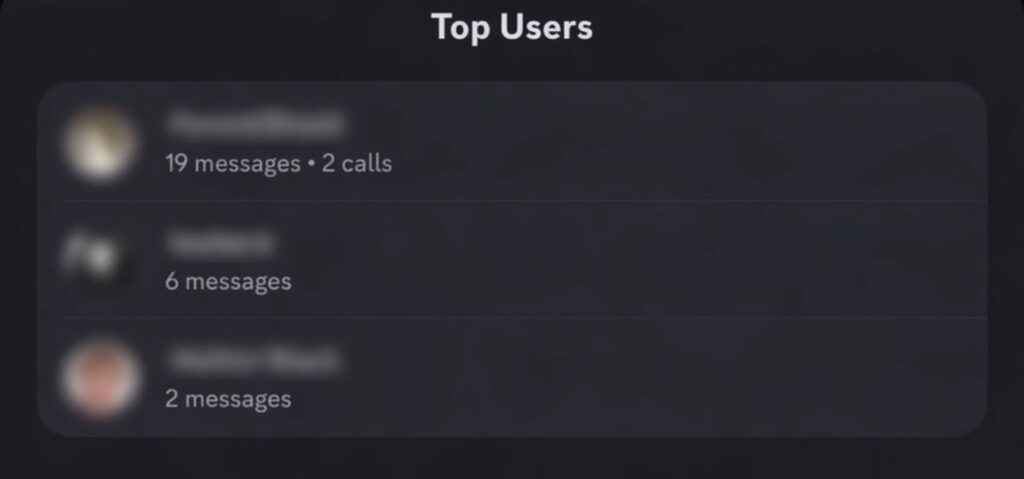
Discord’s Family Centre provides a clear overview of the child’s activity from the past 7 days. It aims to give parents timely, relevant insights without overwhelming them with too much detail.
While parents cannot access direct content without the child’s device, the feature makes it easier to monitor patterns in behaviour. It highlights changes such as new ‘friends’ and recently joined servers, helping parents spot any unusual or potentially concerning activity.
Will My Child Know I Am Monitoring Their Discord?
During the initial set up, both the parent and child must agree to link their accounts. This helps ensure the child understands that monitoring is in place from the start. After set up, the app does not send ongoing reminders or notifications to the child’s device, although details about the family centre controls remain available within their settings.
If the child later decides that they no longer want to be monitored, they can simply disconnect the linked account at any time. If this happens, the parent receives a notification through Discord as well as an email alert if one was provided during sign up.
The link can be reconnected at any time. However, any previous activity will be cleared, and the statistics will start again from scratch.
If you would like to speak with our support team, please call 0330 122 1180, we are always happy to help where we can!