
When a child with a ParentShield SIM is reported missing.
A parent or guardian using ParentShield may already have access to mobile-network information that could assist officers during a missing-child investigation. This guide explains what may be available, what officers should ask the parent to check, and how an investigating officer can be given temporary access to the ParentShield Portal.
For investigating officers
If the missing child uses a ParentShield SIM, ask the parent or guardian to log in to their ParentShield Portal. Depending on account configuration and recent activity, the portal may contain cell tower information, network metadata, recent call and SMS activity, correspondents, call recordings and other information that may assist enquiries.
Check whether a mobile number is or has been on ParentShield.
Authorised law-enforcement personnel can use this lookup to check whether a UK mobile number is currently associated with ParentShield or has previously been associated with the ParentShield network.
Check whether a number is ours
Enter a UK mobile number in any format, for example 07700 900123 or +44 7700 900123, and we will tell you whether it is potentially a ParentShield number.
Checks are limited per connection. A result here is an indication only. To request information, please follow the process set out on this page.
A mobile network designed specifically for children.
ParentShield is a UK mobile network created for children and vulnerable users. Unlike a conventional consumer mobile service, ParentShield gives the parent or guardian access to a secure online portal containing network-level controls and information relating to the child's SIM.
During a missing-child investigation, the parent may therefore have access to useful information that would not normally be available.
The exact information available depends on the child's recent usage, account configuration and the services enabled.
Important
The ParentShield Portal should be considered an additional source of potentially useful information. It does not replace established police procedures, emergency processes, evidential requirements or formal requests for information.
What may be available in the ParentShield Portal?
The portal can provide a useful picture of recent mobile-network activity. Officers should be aware of the following areas when speaking with the parent or guardian.
Cell Tower Location
The portal may show the location of the cell tower to which the SIM was most recently connected, together with the Last CDR and relevant network identifiers.
Call History
Incoming and outgoing call records can help identify recent contacts, telephone numbers, times and patterns of communication.
Call Recordings
Where call recording is enabled, recordings may be available through the portal and could provide important context around recent conversations.
SMS History
SMS activity may be available within the portal, including recent correspondents and message information where supported by the service.
Recent Correspondents
Recent numbers communicating with the child may help identify friends, family members or previously unknown contacts relevant to enquiries.
New Correspondent Activity
ParentShield can identify communication involving new correspondents, which may highlight a recently introduced contact warranting further enquiry.
AI Call Summaries
Where enabled, AI-generated summaries can help authorised users review the substance of recent recorded calls more quickly.
Call Risk Indicators
Where enabled, calls may display green, amber or red risk indicators designed to draw attention to conversations that may warrant closer review.
Usage Information
Recent usage and relevant account information may provide additional context about how the SIM has been used.
Cell Tower Location & Network Metadata
The ParentShield Portal may display the location of the mobile network cell tower to which the child's SIM was most recently connected.
The portal can also display the time of the most recent relevant CDR together with network identifiers including the MCC, MNC, Cell ID and LAC.
These identifiers are available directly to parents and carers within their ParentShield Portal. They can be shared with investigating officers or other relevant authorities, helping to reduce delays and provide potentially important network information quickly in the event of a missing child.
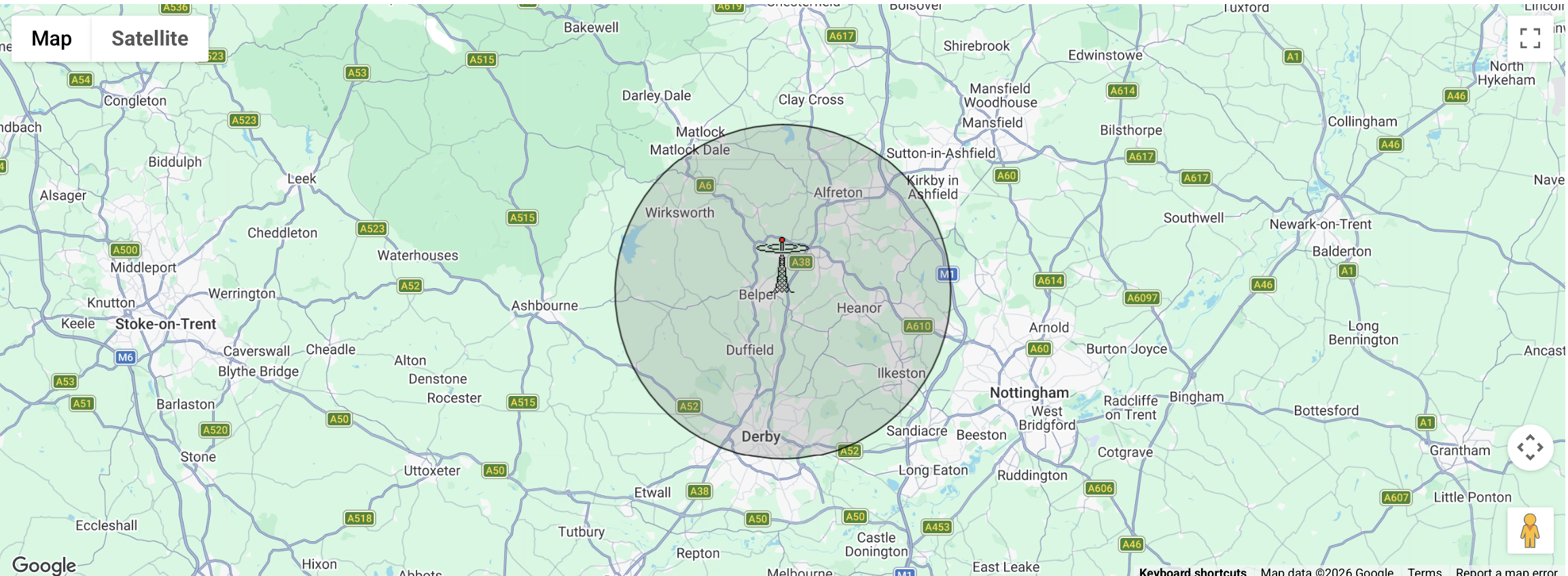
If the child uses ParentShield, ask the parent to open the portal.
The following checks may provide immediately useful information while normal investigative procedures continue.
The parent can temporarily invite an officer into the portal.
Where appropriate, the account holder can create an additional portal user so an investigating officer can review the available information directly. The account holder can then revoke access when it is no longer required.
Open Billing
The parent or account holder signs in to the ParentShield Portal and opens the Billing tab.
Add Portal User
Select Add Additional Portal User within the Billing section.
Invite the Officer
The account holder enters the appropriate details and invites the investigating officer to access the portal temporarily.
Revoke Access
Once the child has been located, or access is no longer required, the parent removes the additional portal user.
Temporary access: The account holder remains in control of portal access. The investigating officer's additional-user access should be revoked as soon as the child has been located or access is no longer required.
Building a picture of the child's recent activity.
No single piece of portal information should be considered in isolation. Taken together, recent network activity may help establish contacts, communications and activity immediately before the child was reported missing.
Information to consider
✓ Most recent available cell tower information and Last CDR.
✓ Last people known to have called or messaged the child.
✓ Previously unknown or recently introduced telephone numbers.
✓ Changes in frequency or timing of communications.
✓ Relevant context contained within available recorded calls.
✓ Conversations highlighted by available risk indicators.
✓ A chronology of recent mobile-network communications.
Does the missing child use a ParentShield SIM?
Use the ParentShield number check above to establish whether the mobile number is currently, or has previously been, associated with ParentShield. If the child is a ParentShield user, ask the parent or guardian to access their ParentShield Portal and check the most recent cell tower information and recent communications. Where appropriate, the parent can then temporarily add the investigating officer as an additional portal user from the Billing tab.
This guidance is intended to make law enforcement and safeguarding professionals aware of information that may be available to a ParentShield account holder. Availability and recency of individual records and features varies according to account settings, service configuration, network activity and usage. Portal information should be considered alongside established investigative, safeguarding, evidential and disclosure procedures.
See exactly where the information is located
This walkthrough is intended for police officers, safeguarding professionals and other authorised investigators who may be unfamiliar with ParentShield.